Most people still think of a chatbot as a window you type into.
People ask a question, they get an answer, and the work of opening files, clicking through apps, or filling a form stays with them. That split has started to blur as assistants move from conversation into the same screens and tools people already use.
Anthropic's Claude already has an assistant capable of using a computer in the background inside Claude Cowork and Claude Code.
Give Claude a task on the desktop and it can click, type, and open apps while the person at the machine works on something else. With Claude 3.5 Sonnet through the API, the model can look at screenshots, estimate where to move a cursor, and simulated clicks and keystrokes.
It was treated as experimental, and that early tests suggest it performed well below human levels. Anthropic even said that the system could be slow and error prone.
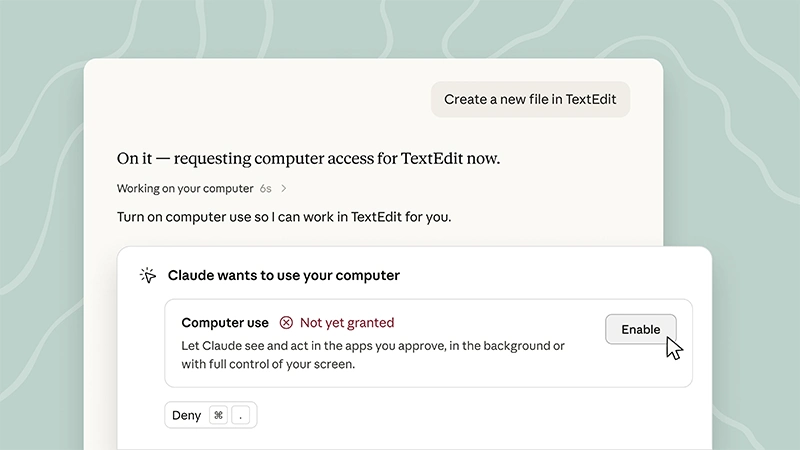
Then, after computer use moved into Claude Code and Cowork as a research preview for Pro and Max subscribers, first on macOS. Windows support followed about ten days later, Claude tries connectors first, such as Gmail, Google Drive, Microsoft 365, or Slack. If no connector fits, it can fall back to a built-in browser or to direct control of the screen.
Users are asked for permission before Claude enters an app.
Now, Anthropic said that Claude can work in background windows instead of taking over the pointer and keyboard.
Anthropic says it generally waits if the user is typing and asks before using full-screen control in a session.
The computer still has to stay on, and the Claude desktop app has to stay open for local files, local tools, and screen control. Cloud Cowork sessions can keep running if the machine sleeps, but they cannot reach the desktop unless the app is connected.
Availability remains limited.
Computer use in Cowork and Code is in beta on Pro and Max plans in the desktop app for macOS and Windows.
It is turned on in Settings under General. Team and Enterprise plans are not included in the consumer computer-use beta described in Anthropic’s help pages.
The company lists several limits and risks.
Claude may need a second attempt on complex workflows. Screen control is slower than a direct integration. Some apps are blocked by default, including investment, trading, and cryptocurrency tools. Users can add apps to a blocklist. Anthropic says the model is trained to avoid certain actions such as trading, entering sensitive data, deleting files, or collecting facial images. It also warns that actions in one app can affect another, that screenshots capture whatever is visible, and that the feature is not a substitute for keeping banking, health, legal, or other personal records out of reach.
Computer use has existed since late 2024 as a developer tool and since early 2026 as a desktop product preview. The newest change is that, on recent macOS versions, that control can run in the background while the user keeps working.
It is still a beta, still permission based, and still dependent on an awake machine and an open desktop app when the task needs the local screen.




















































































































































































































































































