A video keeps moving, and a still does not.
Someone watching a clip often wants the picture at one moment: a face, a title card, a frame they mean to send or keep. The player is already showing it. Having that picture as a file is a separate job, and for a long time the browser was not the tool that did it.
Brave posted a control that does.
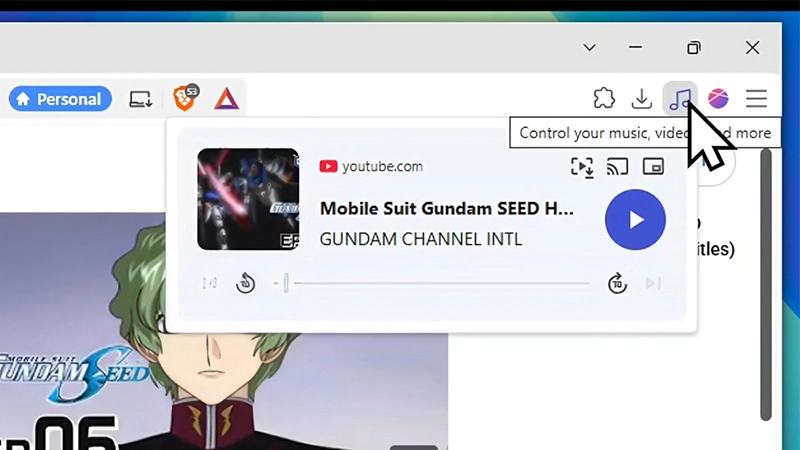
When a tab is playing video or audio, a music-note icon appears on the toolbar.
Opening it shows the existing media panel, the same one used for play, pause, skip, and picture-in-picture. A new button, Save video frame, sits in that panel. It looks like a play icon with brackets. Clicking it opens a normal save dialog, and the user picks the folder.
In the demo, the video was a YouTube page for Mobile Suit Gundam SEED. The file offered was a PNG.
The capture is of the video frame the browser is decoding, not a photo of the monitor, so the player buttons, the timeline, and the rest of the page are not in the image. Brave described it in three steps: open the media player from the music-note icon, click Save video frame, choose where to save the image.
Traditionally, getting that still has been a workaround.
The common method is to pause on the moment you want and take a screenshot of the screen. Pausing is what makes most web players draw their interface over the picture: a play button in the middle, a timeline along the bottom, sometimes a title or watermark.
Some players hide those controls if the cursor is moved away.
Others, YouTube included, keep them up while the video is paused. The screenshot is then a photo of the screen, so it has to be cropped down to the player, and the cursor sometimes remains in it.
If the frame has to be exact, people step through the video and shoot again.
The cleaner version is to leave the browser: download the file, open it in a dedicated video player, and then take a snapshot. But what that means, users must download the whole video for just one picture, which isn't the most convenient thing. And that only works if the site allows users to download the video. Another way, is to use tools like FFmpeg.
In Brave's case, the browser just makes it a lot easier. It utilizes the fact that btowsers have to load frames of a video before it can play it. What this means, saving the current frame is left to the operating system, which can only see the screen, including whatever the player drew on top of it. And here, the button Brave introduces only fetches that frame the browser is already encoding.






















































































































































































































































































