Most of the web work people still do is not writing. It is logging into a portal that never got an API, hunting an invoice that lives three menus deep, copying a number off a dashboard, and filling a form that looks like it was designed in 2014.
Assistants have been good at talking about those pages. However, they have been less good at sitting with them until the task is actually done.
Anthropic wants to change that.
The first, is through Cowork built-in web browser, which has its task workspace already living in the Claude desktop app. Second, is through the Chrome extension a lot of paying users already had in a more limited form.
Taken together they describe two ways Claude can use the web, not one product with a new label.
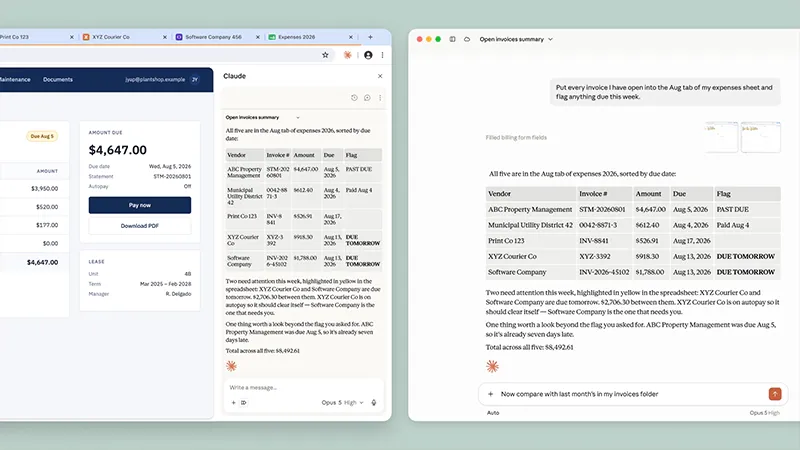
When a Cowork task needs a website, a browser now opens in the side panel of the desktop app.
Claude can navigate, read, click, type, and submit. There is nothing extra to install. The session belongs to Claude, not to the tabs, bookmarks, or saved passwords in the browser you use for email and banking. Logins can be brought over site by site from Chrome, Edge, or Firefox on a Mac, and from Firefox on Windows and Linux. Banking, email, and single sign-on destinations stay out unless you choose to include them.
That isolation is the part people kept circling.
Claude in Chrome still works inside users' existing session, which is useful if the job is updating a CRM they are already signed into or editing a doc that is already open.
The built-in Cowork browser is the other case: research, vendor portals, invoice pulls, dashboards with no connector.
Same model, different environment. One reply put the choice plainly: would you hand the agent your logged-in Chrome, or a clean session of its own.
The Chrome path is no longer a pilot.
As of August 26 it is generally available on every paid plan. Users who have already used the extension, it stays the default. They can switch later under Settings, then Cowork, then Preferred browser.
On its own the extension can see the current page and act on it.
Paired with Cowork it becomes the research layer for longer work that ends in a spreadsheet, a deck, or a report. It is still Chrome only. It does not run on other Chromium browsers or on a phone by itself. File work and other apps still want the desktop app.
Rollout for the built-in browser is gradual through the week on Pro, Max, and Team in the desktop app for macOS, Windows, and Linux in beta. Enterprise can turn it on from organization settings now.
On that plan it starts off, then flips on by default on September 10 unless an admin has already disabled it.
If the desktop app is open and online, a session started on the web or on a phone can still drive that same built-in browser. If the desktop app is closed, Claude in Chrome is what remains for in-tab work. Someone already asked whether Cowork on the web alone is enough. For full browser control, the desktop process still has to be running.
None of this removes the usual failure modes of putting an agent on a live site.
Pages can hide instructions meant to pull the model off the task. Anthropic says the same probes and action checks used in Chrome apply here, and that evaluations against current models look better than the pilot year.
The company still tells people to start on sites they trust. Auth walls, captchas, and "are you sure" modals remain the moments where the agent has to behave like a person, which is also where the work often stalls.
The timing is not accidental.
ChatGPT's Work product landed a browser of its own a day earlier, and a few writers treated the two announcements as a pair aimed at similar desks with different session rules.
The broader pattern is older than either post. Connectors handle the systems that expose an API. The browser is what is left when the work still lives in a page. Computer use, still in research preview in Cowork, sits one layer further out and drives the screen itself when even the browser is not enough.
The order Claude is supposed to try is connector first, then browser, then the desktop.
What changed this week is less that Claude can "browse" and more that the browse step can stay inside the same workspace as the rest of the job. For some people that will mean fewer tab switches. For others it will mean an agent that can file the form instead of listing the steps.






















































































































































































































































































