
Browsers have long served as the default workspace for research, planning, and everyday online tasks that stretch across multiple sessions.
A search for a product comparison, a travel itinerary, or background reading on a complex topic often leaves a trail of open tabs and visited pages. Interruptions are routine. A meeting, a meal, or simply the end of the day can break the flow, and returning later usually means reconstructing context from memory or scrolling through a crowded tab bar to piece together what mattered before.
That pattern of starting something online and then struggling to resume it is familiar to many users.
Firefox version 154 adds new capabilities to an optional feature called Smart Window that attempts to address part of this friction.
The tool functions as a separate window from standard browsing. It is designed to work with context the user chooses to share, such as open tabs and relevant portions of browsing history, so that unfinished work can be picked up without starting over from a blank state.
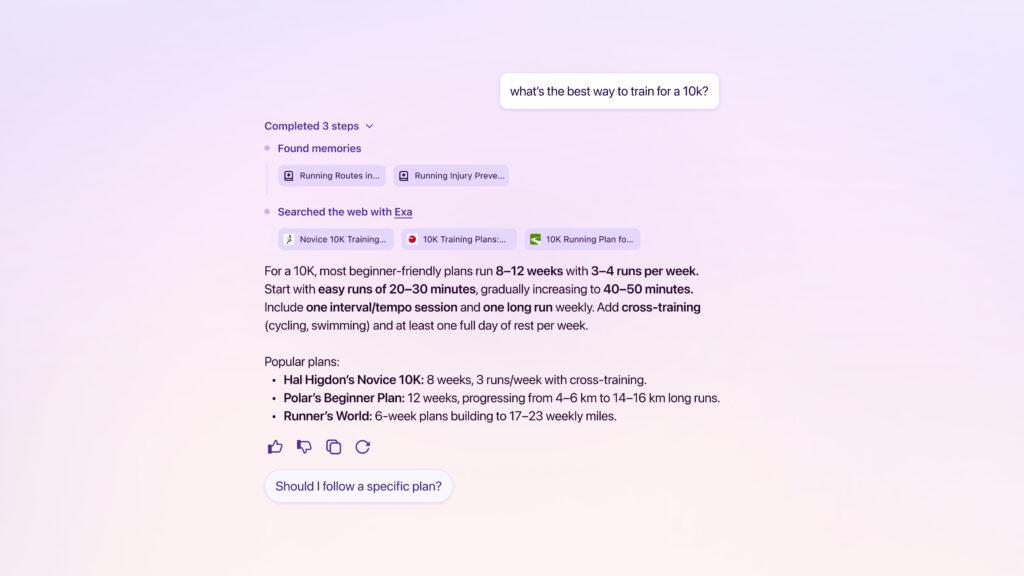
Among the updates is a partnership with Exa, an AI search and retrieval company.
This integration allows Smart Window to pull current web information and display the sources behind its responses without directing the user to a separate search results page.
The idea is that a question arising in the middle of a task can be answered while the surrounding tabs and page remain visible. Sources appear alongside the response rather than buried in a secondary menu, giving a quick way to assess reliability or follow up on the original material.
The feature also suggests groups for related open tabs.
When research on a single subject spreads across many pages, the system can propose organizing those tabs together so they can be managed or returned to as a set. It identifies duplicate tabs that can be closed with a single action.
In addition, Smart Window provides visual previews of pages from browsing history. Users can search that history with natural language prompts, for example referring to items viewed in a prior week, and review thumbnail-style previews to locate the intended page more quickly without opening each result in turn.
Smart Window remains in beta and is fully optional.
Users must enable it themselves through Firefox's AI Controls settings. There they can also select which AI model to use from a small set of options or connect a custom endpoint, including remote services or models running locally.
Data related to the feature stays on the device and is not used to train models. The system can create short summaries called memories based on chats within Smart Window or selected browsing activity.
Users can view, edit, or delete those memories at any time. Private browsing windows are excluded from memory creation. Requests to external models are routed through a Mozilla proxy so that the model provider does not see a unique browser identifier or the user’s IP address.
The concept began as an earlier experiment labeled AI Window, shared publicly in late 2025 to gather community feedback.
Over subsequent months of testing, observations of how people actually used the space led to a shift in emphasis. Rather than focusing mainly on isolated chat interactions, the work moved toward supporting ongoing tasks that unfold across tabs, searches, and interruptions.
Beta participants described using it to keep track of a train of thought or to locate something previously seen without recalling the exact title or path. Those patterns informed the current set of capabilities.
The experience is currently limited to English and available only in the U.S. and Canada, with a sign-up option for notifications in other regions.
Mozilla has indicated that future iterations may surface recent browsing journeys as ready starting points when a user returns to prior work. Controlled assistance with filling online forms, using only information the user has explicitly allowed, is also under exploration.
All such expansions remain subject to the same principle of user permission over which context is accessible.
Coverage from technology outlets has noted the emphasis on choice, model flexibility, and local data handling as distinguishing elements relative to more tightly integrated AI features in other browsers.
Early reactions on social platforms have ranged from interest in the privacy controls and the ability to bring a personal model to skepticism about how well the system will perform for dense research sessions.
For Firefox, Smart Window is also part of a larger attempt to find its place in a browser market increasingly shaped by AI.
Mozilla remains something of an underdog against Chrome, Edge, and other browsers backed by much larger technology companies, while the addition of AI has become increasingly difficult for any browser maker to ignore.
The challenge is not simply adding another chatbot to the browser, but finding a way to make AI genuinely useful without sacrificing the privacy and user control that have long been central to Firefox's identity.

















































































































































































































































































