Home screen widgets have been a staple of Android since its earliest versions, giving people a way to check basic information without opening a full app.
Over the years, customizing them has meant either accepting the fixed designs provided by app developers or spending hours tinkering with complex third-party layout tools.
With AI now becoming a common term, Google is using that dynamic to begin rolling out 'Create My Widget.'
The feature is essentially a new Gemini-powered tool built directly into Android Intelligence that lets people generate custom widgets simply by typing out what they want.
First introduced as part of Google's broader Gemini Intelligence push and expanding more widely through the November 2026 Pixel Drop and Play Store beta program, the feature replaces manual configuration with plain text prompts.
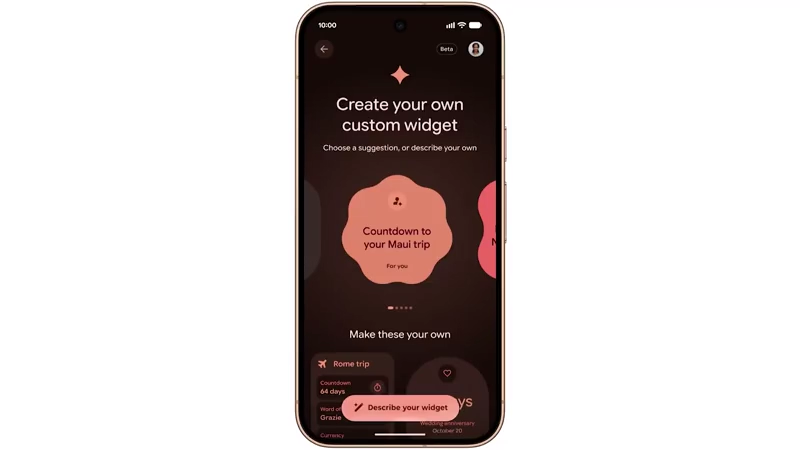
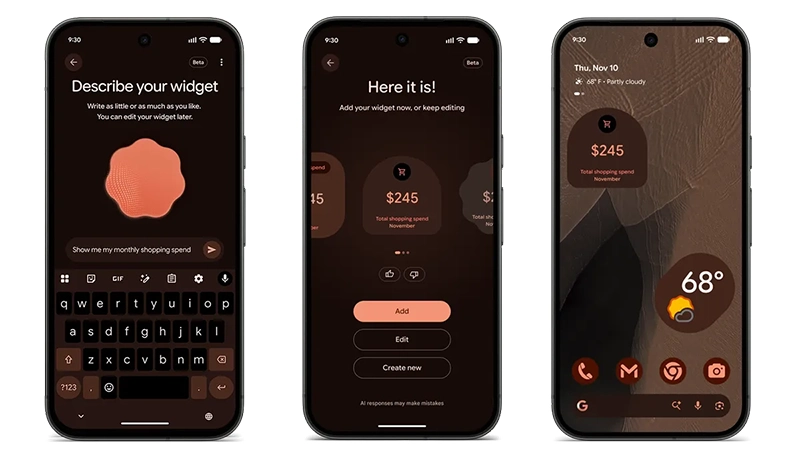
According to a dedicated help page, users can touch and hold an empty space on their home screen, open the widget menu, and tap the Create option. From there, they can either pick from preset categories like finance, sports, or important dates, or describe a specific layout in their own words.
Once a prompt is entered, Gemini generates a working preview on the screen.
A user might ask for a countdown to a specific trip, a local transit schedule filtered by route, a monthly spending tracker, or a weather display that combines several data points at once.
Because the tool connects to Google Workspace and Gemini Connected Apps, it can pull relevant details from Gmail, Google Calendar, and Google Search when granted permission. If the initial result is not quite right, users do not have to start from scratch.
Both during the preview stage and after a widget is already placed on the home screen, users can select an edit option and type follow-up instructions to adjust the layout or information.
While the tool lowers the barrier to building personalized displays, it currently comes with several practical and regional limits.
For now, Create My Widget is restricted to users aged 18 and older on select Gemini Intelligence devices, including the Pixel 10 series (excluding the Pixel 10a), the Pixel 11 series, and newer hardware like the motorola signature 27.
It operates only in English across five countries: the United States, the United Kingdom, Canada, Australia, and India, though users in the UK currently do not have access to the Gemini Connected Apps integration.
Google has also noted that higher usage tiers may require a subscription, and a version for the Pixel Watch is scheduled to follow in the coming weeks.
Early testing also highlights a few technical boundaries.
The system handles straightforward, information-heavy widgets well, especially when pulling from public feeds or Google services, and it asks for device or data permissions on a case-by-case basis.
However, requests involving multi-step interactions or third-party data sources often require several rounds of text adjustments, and some external connections still ask users to supply their own API keys.
Google also advises users to double-check the information displayed on AI-generated widgets for accuracy.
Even with those early constraints, the release points toward a shift in how mobile interfaces are built, moving routine customization away from rigid menus and toward simple conversation.