 Flickr is no longer the photo-sharing website it was before. With Flickr version 3.0, the app features Instagram-like filters and in-depth editing tools that smartphone photographers will like.
Since Marissa Mayer took over at Yahoo!, she has made a steady push to rebuild the photo-sharing community at Flickr by overhauling its products. On April 17th, 2014, Flickr is getting its most dramatic makeover with a total redesign of the apps for iOS and Android, making it a more direct competitor to Instagram and other photo-sharing services.
It takes the easy-capture and sharing features of Instagram and pairs them with the easy to use backup of Dropbox. The result is an app that is faster and more fun to use.
Previous versions of Flickr apps was more like a scaled-down version of its website than an app dedicated for social community and image sharing. The new version of the app improves on its predecessors with a faster, more fluid feed that replaces the previous dual-column view with a scrolling feed of single images.
With photo sets still display as square grids, Flickr crops non-square photos in the feed while tapping reveals them at their original size. Users can see embedded data of photos by simple tap from Flickr's commissioned wireframe drawing of 57 popular cameras.
Faster and More Fluid
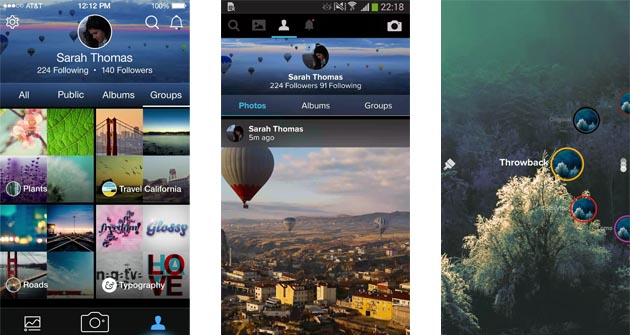
Flickr redesigned its app to be more similar to the experience users had on Facebook's Instagram, even before going to the filters features. When first launching the app, the profile section is the home of the user's photo stream with albums, any groups they have joined with notifications and settings.
The new design focuses on interaction by adding options to favorite, comment, and share photos below every image. It also features a powerful search option on top of the feed with image-recognition technology to help users find images of more than 1,000 objects recognized by Yahoo!'s algorithms.
With 14 filters that can be applied, users can auto-enhance their pictures, crop them, or use Flickr's editing tools to adjust exposure, contrast, white balance, color levels, and other settings. More significantly, the camera can now shoot, edit, and upload high-definition videos of up to 30 seconds.
While filters and editing tools are common in most photography apps, the option for users to automatically sync their photos to Flickr with a terabyte of free storage is useful and may come in handy. A terabyte space which is enough for roughly 500,000 photos; more than what users can have from Dropbox/Google Drive/iCloud; and a lot more than a smartphone can store, is a good option of a place to store photos when a mobile device begins to run out of space.
The Flickr apps for iOS and Android are similar but not identical. On iOS, the navigation controls are on the bottom of the app, as they are on Instagram; on Android, they're at the top. And the editing tools work differently depending on your platform - on iOS, they're accessed from a menu underneath the captured image; on Android, they pop out in a cog design layered over the photo.
Over 100 million people have uploaded more than 10 billion photos to Flickr. Since it was first introduced in 2004 as the original mainstream social photo platform, Flickr that is part of Yahoo! has met many competitors which many of them have taken the lead. And to make it back on its pace, Flickr new design will make it more or a competition, even if mimicking its competitors is the way to be.






















































































































































































































































































