
As people increasingly use digital assistants for everyday tasks, their conversations can cover everything from work and personal decisions to health and finances.
Keeping these discussions available for future reference can be useful, but not every conversation needs to remain visible in an ordinary chat history. OpenAI is addressing this concern with 'Locked Chats.'
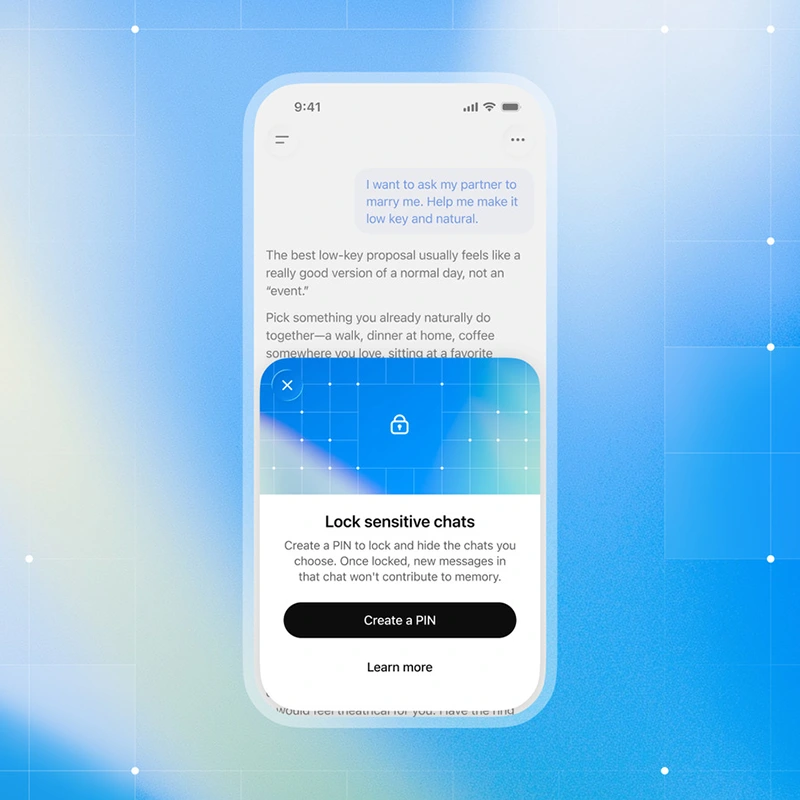
The feature allows users to protect selected conversations with an additional authentication step.
Instead of deleting a chat or using a temporary session, users can keep it saved while moving it out of their regular conversation list.
Locked Chats is intended to limit casual access to sensitive discussions, particularly when someone else briefly uses a device or views an open account.
Locked conversations are moved into a dedicated section under Projects in ChatGPT.
Their titles and contents no longer appear in regular chat history, pinned conversations, or standard conversation search. Access requires a four-digit PIN, with Face ID, Touch ID, or supported device authentication also available on compatible mobile devices.
The account PIN can be used across supported devices, while biometric authentication must be configured separately on each device.
To lock a conversation, users can open the three-dot menu beside an eligible chat and select Lock chat. After setting or entering a PIN, the conversation moves into the locked section. Users can return to it by opening Locked Chats and authenticating. Selecting Lock now ends access immediately, while access also expires after inactivity. On the web, refreshing the page or closing the tab ends the current access session.
Locked Chats differs from Temporary Chats in its purpose.
Temporary Chats are designed for conversations that users do not want saved in their regular history and follow separate rules for memory and model improvement. Locked Chats, by contrast, retains conversations users want to revisit while keeping them out of ordinary view.
The feature does not automatically remove information already saved to ChatGPT's memory or change the account's existing data and model-improvement settings.
The lock also does not provide end-to-end encryption or create a separate encrypted storage system.
It is an access-control measure rather than a comprehensive privacy guarantee.
Existing shared links are another consideration: locking a conversation does not automatically revoke a link created earlier, which must be deleted separately if access needs to be withdrawn. Users should also be aware that a conversation may remain visible in an already-open browser tab until the interface refreshes.
A more consequential limitation concerns forgotten PINs.
OpenAI distinguishes between changing a PIN and resetting one. Users who know their current PIN can change it without losing their locked conversations. However, resetting a forgotten PIN permanently deletes all locked chats, along with files, other protected content, and information remembered only within the locked section. The deletion cannot be undone, and OpenAI Support cannot recover the affected content.
Users must confirm the deletion before completing the reset.
This makes it important to understand the recovery process before storing material that may be difficult to replace.
Changing a known PIN is a routine security action, whereas resetting a forgotten one carries a risk of permanent data loss. Users who keep lengthy discussions or important files in Locked Chats should take that distinction into account.
It's worth noting that not every conversation can be locked.
OpenAI's documentation lists several exclusions, including temporary chats, archived conversations, group chats, conversations created from shared links, chats with scheduled tasks, and chats containing meeting recordings. Availability may vary by platform and account.
OpenAI is rolling out the feature across Free, Go, Plus, Pro, Business, Enterprise, and Edu plans, excluding ChatGPT for Healthcare. On desktop, it is supported in the newer ChatGPT applications for macOS and Windows.
For organizations using ChatGPT, Locked Chats does not override workplace retention policies or compliance requirements. Enterprise and Edu conversations remain subject to applicable retention rules and may still be included in message logs available through OpenAI's Compliance Platform. Locking a conversation therefore does not necessarily prevent authorized organizational access.
Locked Chats offers a way to separate selected conversations from everyday chat history without giving up the ability to revisit them.
Its usefulness depends on what users need to protect: it can reduce casual visibility, but it does not change the underlying data-handling rules or eliminate every route through which information may remain accessible.






















































































































































































































































































