
Video tools used to split people into two camps: those who could sit in an editor for hours, and those who posted whatever their phone captured.
That line has been fading for a few years, as large language models (LLMs) learned to turn a sentence and a still photo into motion. The latest shift is quieter than a keynote. It is about who gets to sit at the same table.
Google has Gemini, and now, it is putting Gemini Omni 1.1 Flash inside 'Google Vids' and opened the AI video path to anyone with a personal Google account or a Workspace login.
The official thread from News from Google walks through three steps: direct a story with templates, reference images, or a rewritten prompt; control each scene by setting clip length and generating or upscaling to 1080p while extending footage with more stable characters, lighting, and style; then download the file or send it to YouTube or Drive.
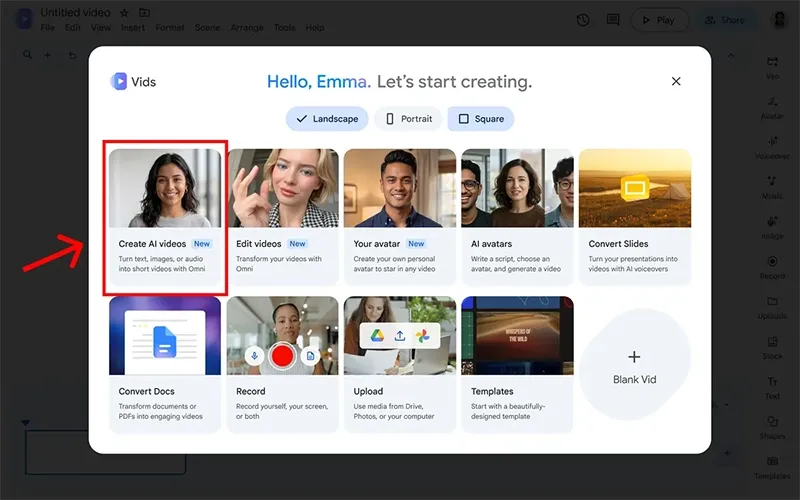
In a blog post, Google details that users can go to vids.new on desktop, then "Create AI videos."
Omni is not new.
Google introduced the family at I/O in May as a model that takes mixed inputs (text, stills, clips, audio) and reasons across them instead of stitching separate generators together.
Flash arrived first in the Gemini app, Flow, and YouTube Shorts.
In July it landed in Vids for paid Google AI and Workspace customers, along with personal avatars that carry their own age, language, and region rules.
The September change is access and craft knobs more than a brand new model: free generation for ordinary accounts, explicit duration control so a clip can match a voiceover, 1080p output or upscale so AI shots sit next to other timeline footage, and longer scene extensions that look at more prior context than earlier versions.
What the free tier actually includes is still the least clear part of the announcement.
Google's consumer post does not publish a generation quota.
Later coverage and help-center tables describe monthly credits or a small number of clip and avatar generations for personal accounts, with Google AI plans and higher Workspace tiers buying larger pools and admin tools.
Creation and editing stay on desktop.
Finished videos can be watched on a phone.
Every Omni 1.1 clip in Vids carries an invisible SynthID watermark so the file can be checked as AI-made. A text-to-speech layer, Gemini 3.8 Flash-Lite across more than 100 languages, is listed as coming soon rather than live.
The use cases Google lists are ordinary: a product photo turned into a short promo, a local event notice, a landing-page loop, a community fundraiser.
That is the point of putting the model in Vids instead of only in a research demo.
The editor already holds templates, a timeline, and export paths people already use at work. Omni sits on that rail so a user can generate a scene, stretch it without a hard cut in character or light, and ship it without opening a separate suite.
Limits still matter.
Short generated clips are not a substitute for a long shoot. Consistency is better than earlier Omni Flash in Vids, according to Google's Workspace update, but it is still model output.
Watermarking answers one transparency question and leaves others (policy, attribution, platform rules) to whoever publishes the file. Paid plans remain the path if six or so tries a month is not enough, or if a team needs quota that an admin can see.
For now the experiment is simple and public.
Sign in on a computer, open Vids, pick Create AI videos, and see whether a prompt plus a reference still is enough to get a 1080p scene that can be timed, extended, and sent to Drive or YouTube.
That is a narrower story than "anyone can make cinema," but wider than last year's professional-only Vids.






















































































































































































































































































