
Google thrives as on the internet from the ads it shows to internet users. For that reason, the company really wants advertisers to adopt their best practices with Google.
Using AdWords Editor (AWE) version 12, Google introduces a section to show things that advertisers aren't yet complying, as well as some new features that comes along with it.
The first is the 'Custom Rules' section which can be found in the left navigation menu in AWE. This section reports warnings when advertisers aren't having at least four sitelinks or callout extensions, using manual bidding, not having search audience assigned to campaigns, not having conversion tracking and more.
"With AdWords Editor 12, you can now use custom rules to check for changes that don't align with your best practices," said Google on its blog post.
There is also a built-in custom rule to show advertisers how many ad groups they have that are fewer than three ads.
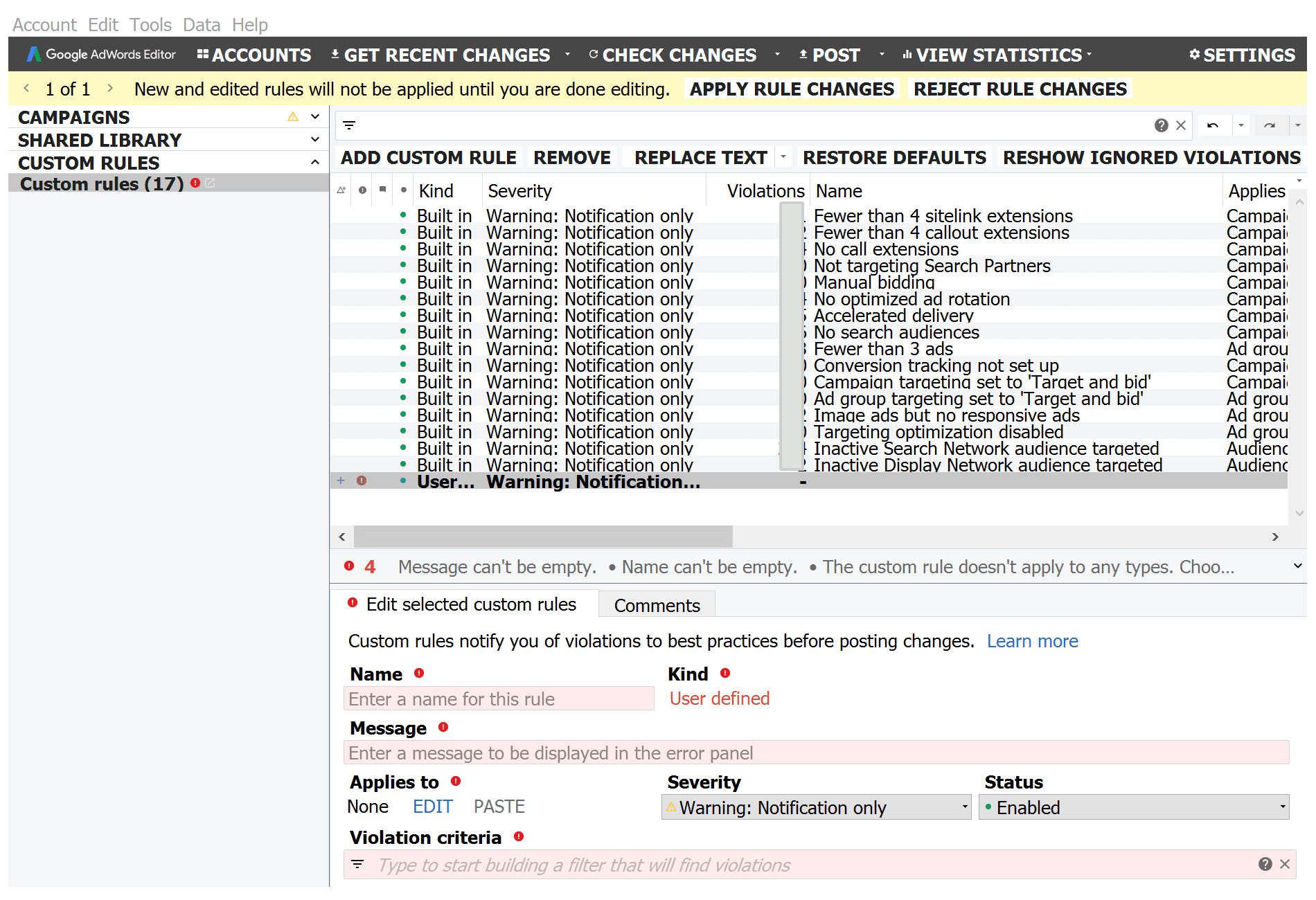
The image above (courtesy of Search Engine Land), is a screenshot showing the list of built-in custom rules. This page is always available to see (showing "0" in the column if there are no warnings or violations).
Advertisers can also see the editor pane for setting up their own custom rules in order for them to quickly see any warnings or errors. They can filter the custom rules in the violation criteria box.
AWE 12 also allows advertisers to set up Custom Riles to apply to campaign, as well as ad group labels for convenience.
For advertisers to see what entities have violation for any Custom Rule, they can right-click on a rule and select "Show violations" located at the bottom of the menu. They can also build their own filter by clicking on the filter box and scroll down to select any on the list under the 'Custom rule violation filters'.
AWE 12 also introduces a design change. The new look is meant to better align AWE with Google's Material Design language.
Other features included are minor. They include supports bidding to maximize conversion, uploading up to 20 images and videos for Universal App Campaigns, and new customization fields dedicated to responsive ads.
While the changes are subtle, they won't affect how advertisers manage their accounts. Instead, according to Google, they'll have "a more cohesive visual experience across AdWords Editor, the new AdWords experience, and other Google products."




















































































































































































































































































