Opera has long occupied a quiet but persistent corner of the browser landscape.
While a handful of larger companies command the bulk of global usage, the Norwegian-developed browser has spent more than three decades carving out space through steady experimentation rather than sheer scale.
Its market presence remains modest, hovering near two percent worldwide, yet it has repeatedly introduced interface ideas and built-in tools that later appeared in more widely used products.
That pattern of incremental refinement continues in Opera One, the company’s flagship Chromium-based browser.
And now, Opera released an update that adds an optional vertical tab layout and makes Google Lens easier to reach from the start page.
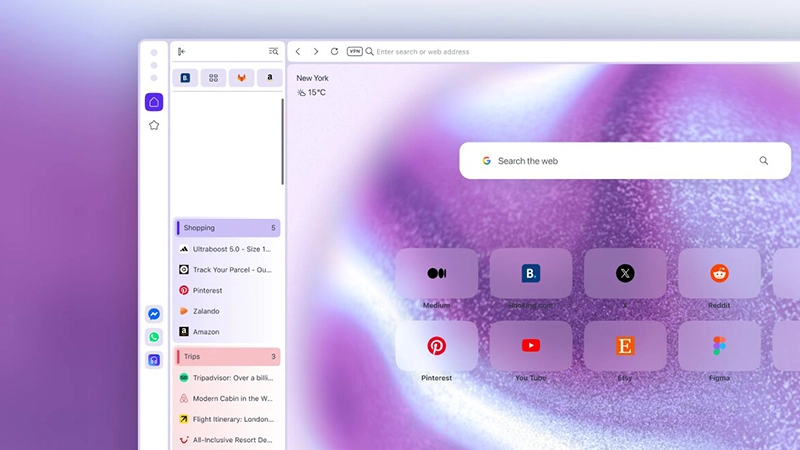
Vertical tabs move the familiar row of open pages from the top of the window to a resizable strip along the side.
Each entry shows both the site’s favicon and its full title, so labels stay readable even when twenty or more tabs are open.
Horizontal tabs, by contrast, often shrink until only icons remain, forcing users to hover or cycle through them to find the right one. The side panel can be collapsed when extra screen space is needed, and pinned tabs appear as a compact grid at the top of the strip. Users can also switch to an icon-only view if they prefer a narrower panel.
Opera’s existing Tab Islands feature, which groups related tabs into collapsible clusters, continues to work inside the vertical layout.
Groups created in one orientation remain intact when the user switches back to the traditional horizontal bar, preserving the organization without extra steps.
The change is entirely optional.
It can be enabled by right-clicking any tab and choosing "Use vertical tab strip," by toggling the same option in the Easy Setup panel under Layout, or by visiting the Tabs section in the browser’s settings.
Switching back follows the same paths.
Alongside the tab redesign, Google Lens receives a more prominent placement.
A dedicated button now sits in the search field on Opera's start page. Clicking it opens a dialogue that accepts images through file upload, drag-and-drop, clipboard paste, or a direct URL.
From there the tool can identify objects, locate the original source of an image, extract visible text, or surface similar products, with results loading in the current tab. Lens has been available in Opera One for some time; the update simply lowers the number of steps required to use it.
These adjustments fit Opera's established approach of refining everyday browsing mechanics while leaving users free to keep the interface they already prefer.
Feedback channels inside the browser and on public posts remain open, and the company has noted it is already exploring ways to surface recently visited tabs within the new vertical strip.

















































































































































































































































































